
The $82k API Key Mistake: Why AI SaaS Needs Cost Guardrails
A real-world incident: one startup's AI bill jumped from $180/month to $82,000 after a Gemini API key was exposed. Learn the production guardrails every AI SaaS must implement.
In early 2025, a small AI SaaS startup discovered their Google Cloud bill had spiked from roughly $180 per month to over $82,000—in a single billing cycle. The cause wasn't a runaway model or a bug in their code. It was an exposed Gemini API key, scraped from their frontend, and abused by attackers who ran millions of requests through their account. This is the story of what happened, why it happens so often in AI startups, and the five production guardrails that could have prevented it.
Incident Summary
What happened: A Gemini API key was embedded in client-side JavaScript. Attackers discovered it, extracted it, and used it to generate massive AI inference costs—$82,000 in one month.
Root cause: AI API key security was treated as an afterthought. No backend proxy, no rate limits, no cost alerts.
Lesson: Exposed API keys plus AI pricing models equal financial disaster. DevSecOps for startups means building cost guardrails from day one.
The Story: From $180 to $82,000
The startup had built a clever AI-powered writing assistant. They shipped fast—solo developers and indie hackers know the drill. To keep things simple, they called the Gemini API directly from the frontend. The key lived in an environment variable that got bundled into the client. "We'll move it to the backend later," they thought. Later never came.
Within weeks of launch, automated scripts began scanning the web for AI API keys. Their key was found, extracted, and added to a list. Attackers—often reselling access or mining for training data—hit the endpoint at scale. The startup had no rate limiting, no anomaly detection, and no billing alerts. By the time they noticed, the damage was done.
Key Lesson: An exposed API key in frontend code is not a "we'll fix it later" problem. It's a "we might not have a company tomorrow" problem. AI API key security is non-negotiable for production readiness.
How the Attack Worked
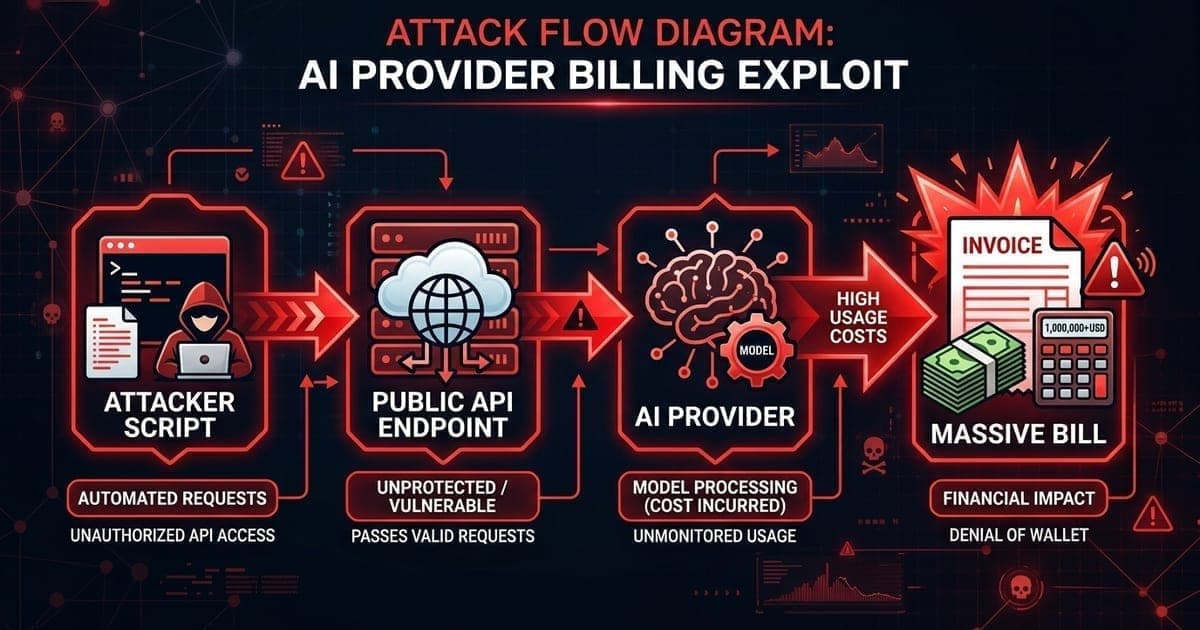
The attack flow was straightforward:
1. Discovery: Bots scan public JavaScript bundles, GitHub repos, and mobile app binaries for API keys. Keys for OpenAI, Anthropic, Google Gemini, and others are high-value targets.
2. Extraction: A regex or simple parser finds keys in seconds. No sophisticated hacking required.
3. Abuse: The attacker's script hits your API endpoint directly—or, if the key is in the frontend, hits the AI provider's API directly. No backend, no proxy, no defense.
4. Bill: You pay. Per-token pricing for LLMs means $82,000 can accumulate in days.
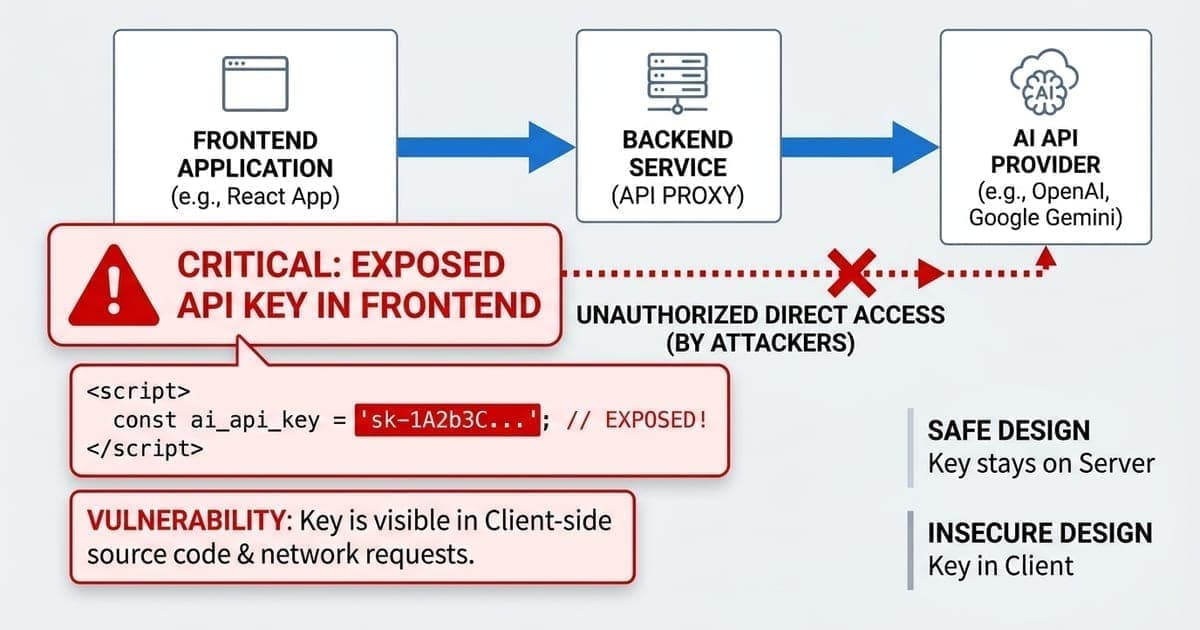
Here's the vulnerable pattern—the kind of code that gets startups into trouble:
// VULNERABLE: API key in frontend—never do this
const GEMINI_KEY = "AIzaSy...";

fetch("https://generativelanguage.googleapis.com/v1beta/models/gemini-pro:generateContent", {
  method: "POST",
  headers: { "Content-Type": "application/json" },
  body: JSON.stringify({
    contents: [{ parts: [{ text: userInput }] }],
  }),
});
Common Mistake: Treating AI APIs like public CDNs. They're not. Every request costs money, and an exposed key is an open wallet.
Why This Happens So Often in AI Startups
Solo developers and indie hackers move fast. AI APIs are easy to integrate—a few lines of code and you're live. The temptation to call them directly from the frontend is real: no backend to maintain, no proxy to build, no DevOps overhead. For an MVP, it feels pragmatic.
But AI SaaS security is different from traditional web apps. The cost model is usage-based and unbounded. A single key can generate $10,000 in charges in hours. There's no "max requests per day" safety valve unless you build one. Production readiness for SaaS means assuming your keys will leak—and designing for it.
The Financial Risk of Exposed AI APIs
AI providers charge per token. A typical request might cost $0.001 to $0.01. That sounds trivial until you scale: 10 million requests at $0.008 each is $80,000. Attackers run scripts 24/7. They don't care about your burn rate. Without cloud cost guardrails—budget alerts, rate limits, per-key quotas—you only find out when the bill arrives.
API abuse protection isn't optional for AI SaaS. It's the difference between a sustainable business and a bankruptcy filing.
5 Production Guardrails Every AI SaaS Must Implement
Production Guardrail: These five controls form the baseline for AI API security. Implement them before you have real users—or real bills.
1. Never Expose API Keys in the Frontend
All AI API calls must go through your backend. The key lives in a secrets manager or environment variable—server-side only. The frontend talks to your API; your API talks to the AI provider.
// SECURE: Backend proxy
// Frontend calls YOUR API
const response = await fetch("/api/ai/complete", {
  method: "POST",
  body: JSON.stringify({ prompt: userInput }),
});

// Your backend (Node, Python, etc.) holds the key and calls Gemini
2. Implement Rate Limiting
Limit requests per user, per IP, or per API key. Use API Gateway, Kong, or a simple middleware. Return 429 when limits are exceeded. Attackers rely on unbounded access—rate limiting cuts them off.
3. Set Budget Alerts
Configure billing alerts at $100, $500, $1,000—whatever your risk tolerance. Alert immediately. Don't wait for the monthly invoice. Cost guardrails mean knowing when something is wrong before it's catastrophic.
4. Use Per-Key or Per-User Quotas
If you must have multiple keys (e.g., for different environments), set quotas per key. Cap daily or monthly spend. Hard-stop when the limit is reached. Require manual review to increase.
5. Monitor and Alert on Anomalies
Track requests per minute, cost per hour, geographic distribution. Alert on sudden spikes. Automated scripts often show patterns—unusual volume, odd user agents, requests from unexpected regions.
Secure Architecture
The right pattern looks like this:
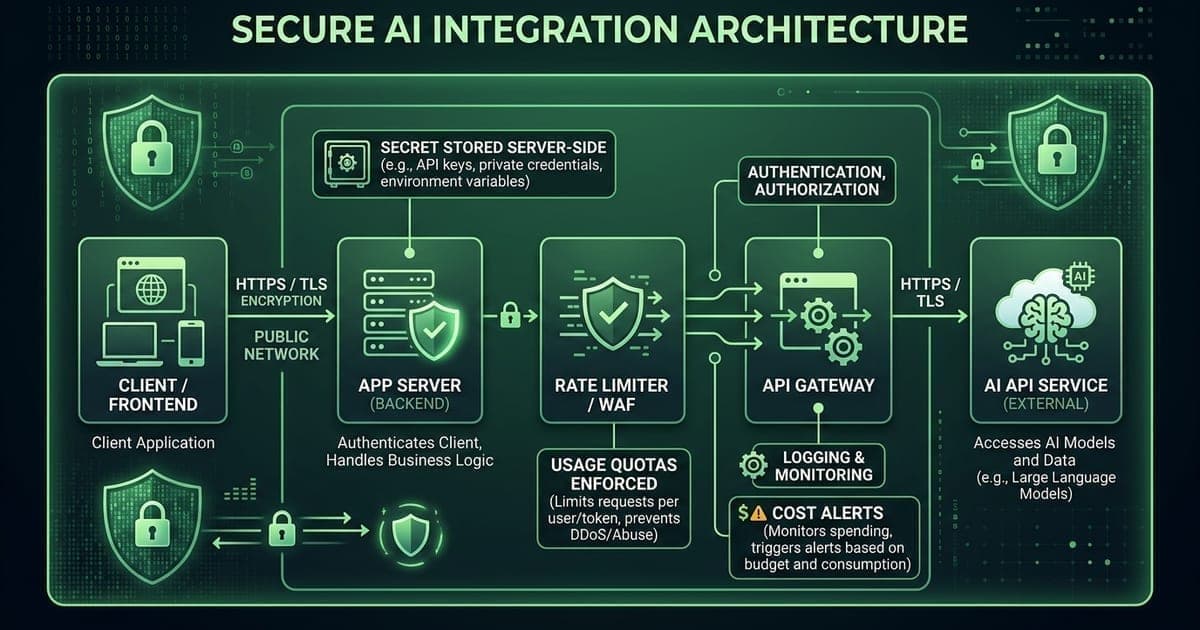
- Frontend: No keys. Calls your backend only.
- Backend: Holds the secret. Validates input. Enforces auth.
- Rate limiter: Caps requests per user/session.
- API Gateway: Optional but useful—centralized throttling, logging.
- AI API: Called only from your controlled infrastructure.
Quick Checklist
Before you ship your AI SaaS to production:
- [ ] API keys are stored server-side only (Secrets Manager, env vars—never in frontend)
- [ ] All AI requests go through your backend
- [ ] Rate limiting is enabled (per user, per IP, or both)
- [ ] Budget alerts are set ($100, $500, $1,000—pick your thresholds)
- [ ] You have visibility into usage (dashboard, logs, or both)
Protect Your AI SaaS Before It Becomes Expensive
The $82,000 mistake didn't have to happen. A backend proxy, a rate limit, and a $500 billing alert would have stopped it. DevSecOps for startups isn't about enterprise overhead—it's about the guardrails that let you ship fast without shipping disaster.
If you're building an AI SaaS and want to know where your biggest risks are, a production readiness audit can identify exposed keys, missing cost controls, and gaps in your architecture—before they become expensive.
---
Ready to harden your AI SaaS? StackRail helps solo developers, indie hackers, and early-stage startups build production-grade infrastructure—without the enterprise overhead.
Need help with production readiness? Get a free 30-minute audit.
Book Free 30-Min Production Audit